Prepare your page and destinations
Create a Landing page with your buttons or a direct link. Check every destination and choose the GetMyPage address or custom domain to share: this will be the public link in your bio.
Create a secure link in bio for Instagram with a configurable shield, a recognizable address and checks before you publish. Real-Safe Link handles supported crawlers; Force Safe protects individual buttons. You can use the same link on TikTok too.
Prepare your page, configure the protection available on your plan and test the link from your Instagram profile. The shield and opening an external browser are separate settings.
Create a Landing page with your buttons or a direct link. Check every destination and choose the GetMyPage address or custom domain to share: this will be the public link in your bio.
Configure Real-Safe Link for the page and Force Safe for individual buttons that need the protected step. Check your plan’s features. Force Safe can stay active while Real-Safe Link is disabled for the rest of the page.
Paste the public address into your Instagram profile’s links field. Open it from the app without an active dashboard session and test the buttons. Then compare the journey with Link Scanner, repeating the check after changing destinations or protection settings.
Protection concerns the path to your content, the identity of your address and checks you can repeat. It does not automatically make an external website safe.
Real-Safe Link handles supported crawlers and protected steps; Force Safe lets you act on a single button. These controls are separate from the deeplink that handles opening an external browser.
A domain connected to your page helps visitors recognize your brand. Keep your Instagram profile, page and destinations consistent, checking the addresses before publishing.
Link Scanner analyzes a public URL without asking for your Instagram password. It shows responses, redirects and differences between simulated profiles. The result describes the test performed without certifying freedom from malware or guaranteeing that platforms will not block a link.
On October 20, 2026 at 12:21 PM (Europe/Rome), we compared a page already in use with the Chrome profile and Link Scanner’s simulated Instagram profile. The page and its address remain anonymous.
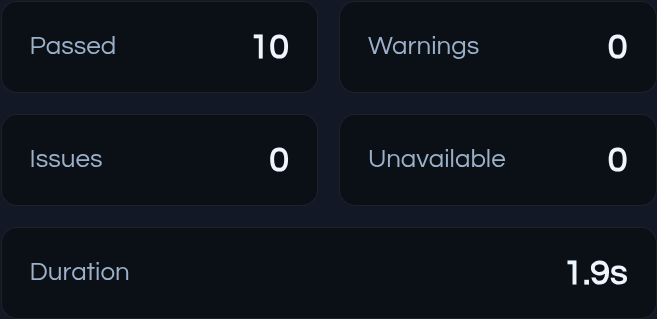
The Chrome profile used in the check received a valid page response. This verifies the observed HTTP opening without replacing a test from the Instagram app.
A different protected response was observed for the simulated crawler profile. This finding applies to that profile and the configuration checked at that time.
Report coverage: 100/100. Link Scanner’s internal score: 100/100. These values describe the checks performed and are not an independent certification.
Source: GetMyPage Link Scanner, checked on October 20, 2026 at 12:21 PM (Europe/Rome) against the verified GetMyPage origin. Identity and URL omitted. An HTTP comparison with two simulated profiles, not an official Instagram test or a malware scan. The result does not guarantee freedom from bans or blocks and may change with apps, networks, destinations and settings.
Three configuration examples: choose according to the destination your visitors need and the features available on your plan.
Bring your website, shop and content together on a Landing page. Enable Real-Safe Link to apply supported crawler handling to the page, then test each button as a visitor from your Instagram profile.
If only one destination needs a protected step, apply Force Safe to that link. The button stays protected even when Real-Safe Link is disabled for the rest of the page.
Share your GetMyPage address or custom domain on both profiles. Test the path from each app and compare sources and clicks in analytics, distinguishing visitors from automated openings.
An anonymized sample from a page already in use with a custom domain: September 10–October 9, 2026, Europe/Rome time zone. Real-Safe Link and Deeplinks Tech were enabled when checked on October 10.
Page openings included after the system’s filtering and deduplication rules. Events classified as bots are recorded separately.
Automated openings identified by the system and kept separate from counted visits. This number alone does not show how many attempts the shield blocked.
Click events recorded for the page’s destinations. They measure recorded steps and do not establish purchases or signups.
Source: GetMyPage analytics for the linked page, which may also be reached through other addresses. The sample covers 30 complete days; settings reflect the October 10 check. It is a snapshot of recorded usage, without a before-and-after comparison or certification of app compatibility. The creator’s identity and domain are omitted.
An anonymized sample from an operating workspace: 16 landing pages and 3 direct links, September 10–October 9, 2026, Europe/Rome time zone. All 19 pages had Real-Safe Link and Deeplinks Tech enabled when checked on October 10.
The sum of openings included after filtering and deduplication were applied separately to each active page.
Automated openings identified and recorded separately from counted visits. They do not automatically equal blocked requests.
Click events on the destinations of the 19 pages. They describe recorded steps without attributing purchases or signups.
Source: GetMyPage analytics for the 19 pages currently active in the same workspace. The sample covers 30 complete days. For this set, the available series also records 132,203 counted visits from June 27 through October 9. The settings shown are those verified on October 10 and do not prove they stayed unchanged throughout the period. Page identities, names, and addresses are omitted.
The guides explain social crawlers, Real-Safe settings and Link Scanner checks without publishing details that could help bypass protections.
It adds a layer of protection to the path leading to your destinations. In GetMyPage, this shield is Real-Safe Link: it manages supported crawler access and protected steps. It does not certify external websites as free of malware.
Create your GetMyPage page, add valid destinations and configure Real-Safe Link in the dashboard. Check that your plan includes the feature. Paste the public address into your Instagram bio and open it from the app without an active dashboard session, testing the buttons too.
Configure Real-Safe Link in the guide →Yes. Force Safe applies the protected step to an individual button or destination and can stay active while Real-Safe Link is disabled for the rest of the page. After saving, check both the protected button and the other links.
You can share the same GetMyPage link on Instagram and TikTok and use a domain connected to your account. The domain must be active and protection configured on the page. Test each channel: the shield and Deeplinks Tech, which handles social browser paths, serve different purposes.
No link can guarantee freedom from bans or blocks imposed by Instagram, TikTok or other services. Real-Safe Link handles supported flows; it does not authorize prohibited content, change platform rules or make a harmful destination trustworthy.
Open the page and its buttons from the apps your audience uses. Then use Link Scanner to compare responses, redirects and destinations received by simulated crawler profiles. Keep the test date and settings: the report describes observed behavior and does not certify the absence of malware or phishing.
Check your link with Link Scanner →Manage pages, protection, domains, analytics and team access from the same platform.
It's our flagship feature. When a user taps your link from Instagram bio on iPhone, GetMyPage moves them out of the in-app browser and into Safari, where your page opens more stable, faster and more measurable.
Learn more →A dedicated path moves users out of TikTok's in-app browser and straight into Safari.
Learn more →Choose a mobile-first landing or redirect straight to your site.
Learn more →Use your domain or create one with us for a professional brand.
Learn more →